My Account Options
¶ Credit Card (Visa / Mastercard / American Express)
¶ Online - One-time Payments
1. Login to the NCF StartPage using your member ID and password.
2. Under the Account section, choose Make a Payment.
3. Fill in the requested information (your name as it is displayed on your card, credit card number, expiry date, and 3-digit CIV, payment or donation amount, and any additional email address you want to email your transaction receipt to). 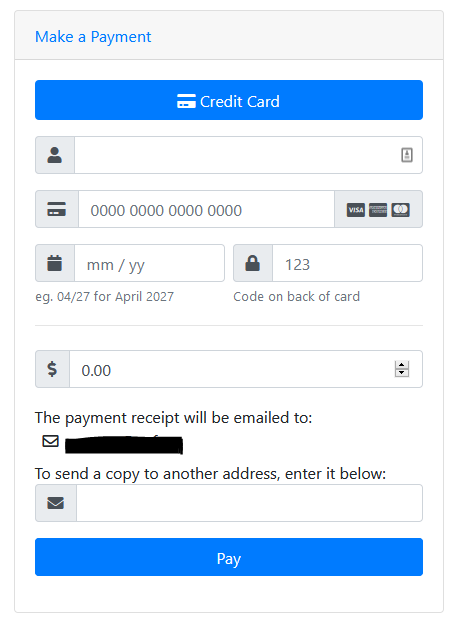
4. Choose Pay. You’ll receive a confirmation that the transaction was successful, along with a transaction number and receipt sent to you by email.
¶ Online - Automatic Payment
1. Login to the NCF StartPage using your member ID and password.
2. Under the Account section, choose Update Payment Information.
3. Click Add Payment Method and fill in the requested information to setup automatic payments.
¶ By Phone
You can pay via credit card over the phone. Our HelpDesk hours are 10:00am-7:00pm from Monday to Friday, and 10am-5pm on Saturdays. Please have the following information handy when you call 613-721-1773 ext. 0:
- Your NCF member ID (e.g. ab123)
- Your VISA, MasterCard or AMEX card number
- Your card’s expiry date
- Your card’s CIV number (the 3 digits typically on the back of the card).
- Your name as it appears on the card
- Whether you want your card card to be charged for one-time or recurring payments/donations
¶ Debit or Cash
You can make a debit or cash payment or donation in person at the NCF Office. Our office hours can be found at https://www.ncf.ca/en/contact/
¶ Cheque or Money Order
Please make the cheque or money order payable to NCF or National Capital FreeNet, and include your name and member ID (e.g. ab123) with the cheque in the envelope.
You can mail it to the NCF office or drop it off at our office in person. Our contact information and hours of operation can be found at https://www.ncf.ca/en/contact/
¶ Interac E-Transfer
You can make a payment or donation by Interac e-transfer:
- Send Interac e-transfers to etransfer@ncf.ca
- No security question is required.
- Note: If your bank does not allow you to send e-transfers without a security question, set a security question and answer and communicate that with the NCF HelpDesk
- Include your member ID as a message/ comment with the etransfer: aa000
Your payment will be applied to your NCF account within one business day of receiving it.
¶ Pre-Authorized Debit (PAD)
You can make monthly payments or donations with pre-authorized debit (PAD). To set-up PAD, we require the following information from your banking institution:
- Transit Number - 5 digits
- Institution Number - 3 digits
- Account Number - 6 to 12 digits
To set-up PAD, you can call our HelpDesk at 613-721-1773 ext. 0 with the information above. Our hours of operation can be found at https://www.ncf.ca/en/contact/
Note: PAD payments cannot be used as a first payment for service activation or hardware.