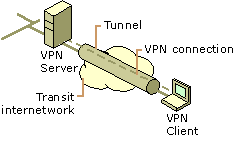
 A Virtual Private Network (VPN) extends a private network across a public network, and enables users to send and receive data across shared or public networks as if their computing devices were directly connected to the private network.
Applications running across the VPN benefit from the functionality, security and management of the private network.1
A VPN is created by establishing a virtual point-to-point connection through the use of dedicated connections, virtual tunnelling protocols, or traffic encryption
Extra overhead is needed to implement the connection so throughput (speed) is marginally reduced. From a user perspective, the resources available within the private network can be accessed remotely.2
¶ Security Model
A VPN provides:
- Confidentiality - if network traffic is sniffed then an attacker would only see encrypted data
- Authentication - to prevent unauthorized users
- Integrity - to detect tampering with transmitted messages
Note that using a VPN does not provide anonymity.
¶ Use a VPN?
Typical uses include:
- Securing communications when using untrusted third party networks (e.g. Public WiFi Hot Spots)
- Circumventing geo-blocks (e.g. accessing UK or US Netflix content) - but note that some sites block access from known VPN servers
- Circumventing censorship (may be illegal in some jurisdictions – e.g. China)
- Masking your traffic from your ISP
¶ Flavours
VPNs can employ different technologies:
- L2TP/IPSec – can sometimes have problems with NAT
- PPTP – Microsoft led solution but now considered obsolete with weak encryption
- SSL/TLS – can handle entire networks as well as individual connections (e.g. OpenVPN)
- IKEv2 – part of the IPSec suite, uses X.509 certificates but considered vulnerable
- SSTP – Microsoft solution transports PPP via SSL but only for end clients, not site to site implementations
¶ What Do I Need?
VPNs use a client-server model. The server determines the technologies to be used and consequently the client software required. Many commercial enterprises provide VPN server access for a fee. For a good rundown on these see:
The service will provide configuration file with instructions or dedicated client for installation on your equipment
Client software may be built in the OS or installable:
- Windows natively supports PPTP, L2TP/IPSec, SSTP and IKEv2, OpenVPN client via download
- Linux software repositories have all client types available
- Smartphones and devices natively support different protocols but often support other protocols via app store
- Mac OS natively supports PPTP, L2TP/IPSec and others via download
¶ How to Decide on a VPN Service?
PrivacyTools.io recommends that your VPN service:
- Operate outside of the Five Eyes countries.
- Support OpenVPN
- Accept anonymous payment options (e.g. Bitcoin, cash, gift cards)
- Require no personal information to create an account
Be skeptical of a “No Logging” claims, as server logs are always needed, if only to make sure service is operating normally. For more information see myths about vpn logging and anonymity. 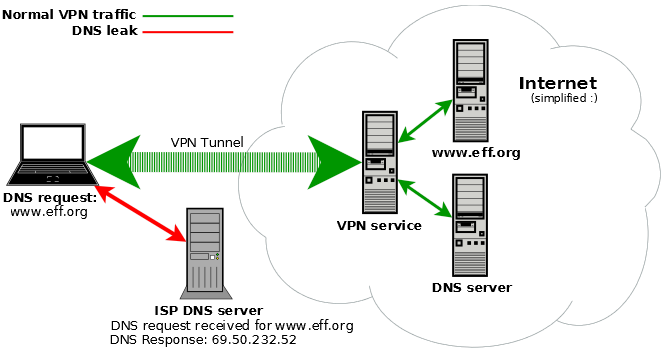 Cost is only one factor, where does privacy stand? All of your traffic will be protected between your device and the server but then traverse the Internet as usual beyond the server The VPN service sees all traffic so use TLS/SSL for all browsing. That way the VPN service only knows where you are browsing to but not the actual conversation.
- Does the VPN service support bit-torrent, TOR?
- Does the VPN service guard against DNS leaks?
DNS leaks happen when your device continues to use your default DNS rather than the one from the VPN tunnel.
¶ Private VPN Services
If your only goal is to secure communications from an untrusted network it can make sense to operate your own VPN server. 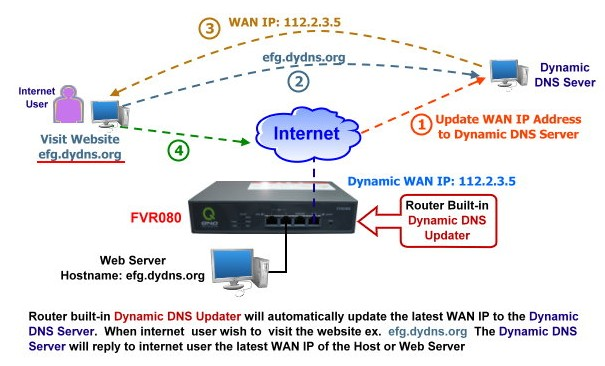
Options include:
- Roll your own by installing OpenVPN server on an existing box
- Install a dedicated Firewall/VPN distro (e.g. pfSense)
- Load DD-WRT, OpenWRT or Tomato on your router and configure OpenVPN server
- Purchase a new router with built in OpenVPN
- Purchase an appliance with OpenVPN embedded
All home grown options require:
- Dynamic DNS service unless you have a static IP
- Port forwarding to route traffic to the VPN server
¶ Network vs End-point VPN Tunnels
VPNs can tunnel whole networks, not just individual end-points (not SSTP based VPNs). When tunneling a whole network the VPN client runs in the network router. The advantage of this is that individual end-points do not require VPN software. End-points are thus unaware of the VPN tunnel.
¶ VPNs in Untrusted Environments
VPNs are ideal when using free Wi-Fi hot spots and other untrusted networks. While each device can establish its own VPN tunnel it can be more effective to use a mini travel router. For captive portal type hot spots you have to agree to terms and conditions before accessing the Internet, so don’t start the VPN until you have access Verify the VPN is established before commencing normal activities.
Check your external IP address before and after the VPN tunnel is established. VPN tunnels can collapse leaving your communications exposed, so periodically recheck your external IP address. Some VPNs have settings that prevent Internet communications outside the tunnel to protect against insecure, open communications.
¶ References
- Mason, Andrew G. (2002). Cisco Secure Virtual Private Network. Cisco Press. p.7
- Microsoft Technet. Virtual Private Networking: An Overview
¶ External links
- Setting up OpenVPN on DD-WRT
- How to Install and Configure OpenVPN on Your DD-WRT Router
- OpenVPN Inline Certificates
- OpenVPN How To Documentation
- OpenVPN Manual Page
- Slant’s Best Free Dynamic DNS Services as of 2017
- Checking Your External IP Address
- Wikipedia article on VPNs
- 7 Reasons Why VPNs Might Die Out by 2020
¶ Videos
- What is a VPN?
- Virtual Private Networking
- The Zero Dollar pfSense Router
- Build a Router with pfSense
- How to Set Up OpenVPN on pfSense
Thanks to NCF volunteer Al Richman for writing this article.