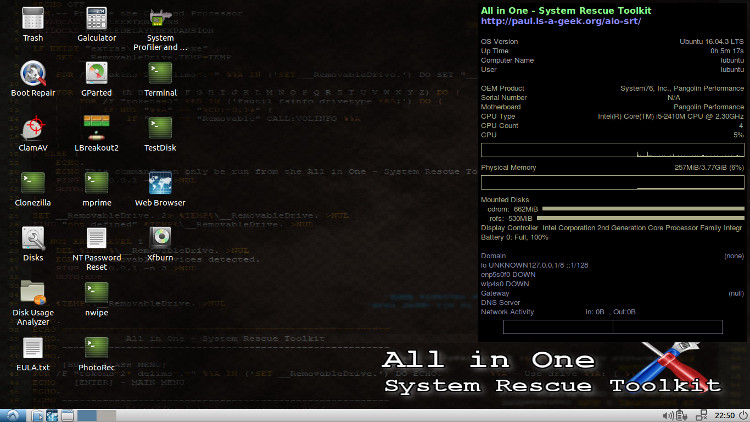
 The All in One - System Rescue Toolkit (AiO-SRT) is a free Linux operating system with a set of recovery and rescue tools, created by Paul Bryan Vreeland, a computer repair technician. Based on Lubuntu, it can be run from a CD, DVD or USB device to recover lost data and fix broken Windows software.
AiO-SRT is Linux-based, and can be used to remove malware, blank hard drives, recover lost files and rescue data, even from a computer that will not boot to Windows. You can boot to AiO-SRT or, if used in a computer running Windows, it will auto-run and load utilities to fix the PC. It is free software, issued under free licenses.
AiO-SRT also comes with the Midori web browser, text editor, calculator and many other applications that are useful in fixing a computer.
¶ Uses
AiO-SRT can be used for several purposes:
- For recovering data, by booting to AiO-SRT and clicking on the icon for the hard drive and then copying documents onto an external device, such as a USB drive. Data recovery tools are also provided.
- For removing malware (with Clam Tk)
- For testing hardware
- For blanking hard drives (with Nwipe), prior to disposing of them or the whole computer, or to blank them prior to installing a new operating system
AiO-SRT has two modes, as a bootable disk and as a Windows auto-run program. Each mode provides different tools to help you troubleshoot your computer. A complete list of the programs can be found on the AiO-SRT official website under “Utilities”.
¶ Getting AiO-SRT
If your computer has a DVD drive, you can download the ISO file from the AiO-SRT official website and burn it to a DVD yourself with an ISO writer. If your computer does not have an optical drive, you can run it from a USB drive, as described below.
AiO-SRT actually is not “installed” like a traditional operating system, instead it is run it from a DVD or a USB device as a “live session”. That means, you can run it on a Windows computer, without changing the Windows installation on the hard drive.
¶ Minimum System Requirements
AiO-SRT used in bootable mode will only run on 64-bit systems, but in Windows auto-run mode it will operate on both 32-bit and 64-bit systems.
¶ Using AiO-SRT
This explains how to get and use AiO-SRT from a Windows PC:
¶ Run AiO-SRT in bootable mode (if you have a DVD already)
- Boot to AiO-SRT (many computers require entering the computer set-up on boot to allow it to boot to a DVD before the hard drive)
- You can access your existing documents from the hard drive, by clicking on the file folder icon on the bottom of the desktop.
- Run any utilities you need to fix your computer, erase your hard drive, etc.
¶ Run AiO-SRT in auto-run mode (if you have a DVD already)
- With the computer on and running Windows, insert the DVD and AiO-SRT should run.
- If it does not run, open the DVD folder and click on the AiO-SRT.exe file.
¶ Run AiO-SRT from your own DVD using Windows
- Download the AiO-SRT ISO file from the AiO-SRT official website
- Download the Null River WinMD5Sum checker from http://www.nullriver.com/downloads/Install-winMd5Sum.exe
- Download the ISO recorder at http://isorecorder.alexfeinman.com/#/
- Launch the WinMD5Sum checker and test the downloaded AiO-SRT ISO file against the MD5SUM for the specific release in the same repository file. (This ensures that the ISO has not been compromised or corrupted)
- Launch the ISO recorder and use it to burn the ISO image to your DVD
- Boot to AiO-SRT (many computers require entering the computer set-up on boot to allow it to boot to a DVD before the hard drive)
- You can access your existing documents from the hard drive, by clicking on the file folder icon on the bottom of the desktop.
- Run any utilities you need to fix your computer, erase your hard drive, etc.
¶ AiO-SRT installation (with your own USB)
To run AiO-SRT from a USB drive from Windows use WinCDEmu and follow the instructions in Paul Vreeland’s video.
You can also create an AiO-SRT bootable USB drive from Windows, using the Universal USB Installer (UUI) in version Universal-USB-Installer-1.9.8.0.exe – January 14, 2018 or later.
You can use the UNetBootIn ISO USB recorder to write the ISO file to a USB or even copy the contents of a written DVD to the stick, but in either case it will not be bootable, although the aio-srt.exe file can be clicked on to run and will then provide the tools to fix any Windows installation.
¶ See also
- https://www.system-rescue.org/ offers a very similar set of tools with a 2024 version compared to AIO SRT last edition in 2018.
- Best Of Free Windows Software
- Lubuntu
- Ubuntu
- Xubuntu