This page contains some miscellanous tips regarding using email.
|
Email Quick Configuration
|
¶ Outgoing Message Rate
Our email system can send up to 200 messages per four hour period per user. Here is a simple example: A user starts sending messages at 8 AM and sends a total of 200 by 10 AM. She will find that she cannot send more until noon, at which time the count restarts. If you need to send the same email to a large group, please contact us to learn about other options.
¶ Webmail vacation messages
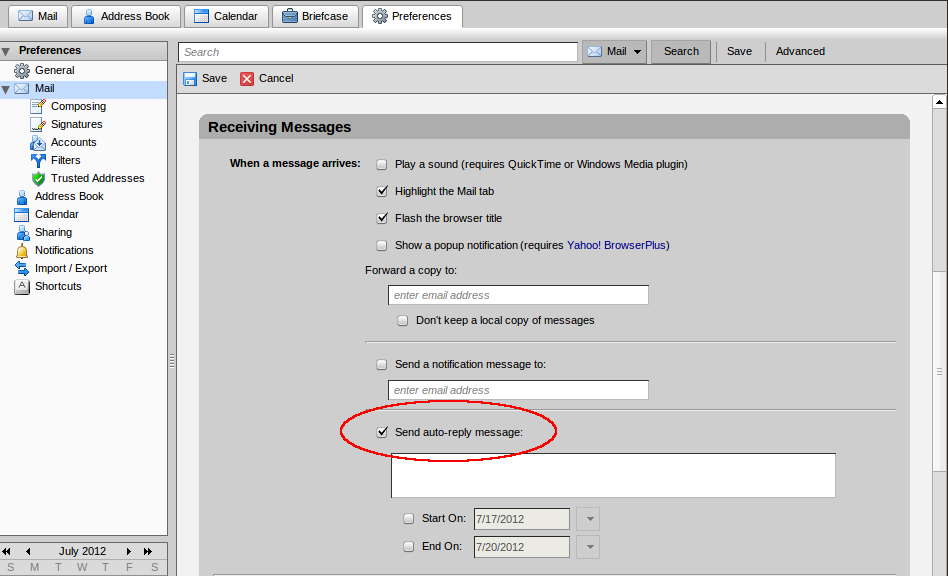
When set, a ‘vacation message’ is automatically sent to anyone who sends email to your account while you are away. Their email waits in your inbox until you return. When you return, be sure to disable the vacation message.
On NCF webmail a vacation message may be set, edited, enabled or disabled at Start page→ Get your webmail to open Zimbra→ Preferences→ Mail→ Receiving messages → Send Auto-reply message. You can then set the text, start date and end date.
¶ Caution
The vacation message was late 20th century invention and was very poplar in the 1990s. In more recent years email vacation messages, both home and work ones, have been implicated in home break-ins. It works like this:
- You set up a vacation message that responds to any incoming message with something like “Hi thanks for your e-mail, I will respond to it when I get back from my vacation in Cuba on 17 January 2012!”
- The message gets sent in response to random spam messages and other junk email.
- Through internet searches, or personal knowledge of who you are, a thief is able to connect your email address and name with a physical home address.
- They go there and break into your home and steal your belongings, knowing you will not be back from Cuba until the 17th. They may even stay there a few days and eat your food, too.
In general, vacation messages are no longer thought to be a good idea for these reasons, especially if they provide details on where you are or how long you will be away. Any close friends or relatives will know you are away and no one else really needs to know that.
Note: This is also a good reason to not post Facebook status updates or Twitter tweets from that beach in Cuba, as they are dead giveaways that your house is empty for a while. You can easily post your photos once you get home.
¶ Email for dial-up
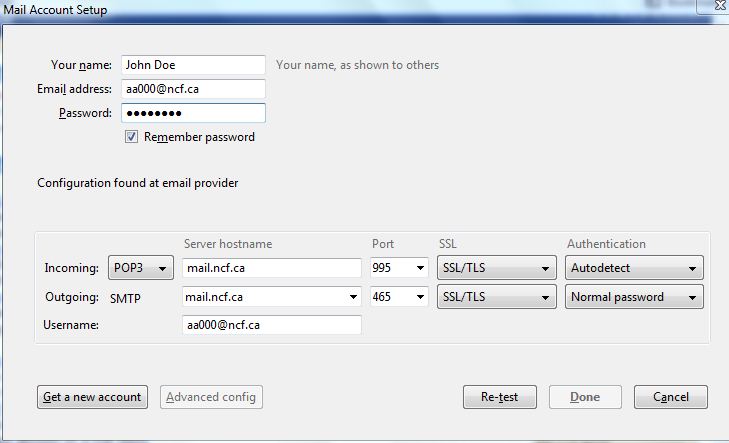 Try using mail client software rather than web mail. You can then read and compose mail offline.
¶ Mozilla Thunderbird
Thunderbird is a fully featured mail client available for Windows, Mac OS X and Linux.
Here are instructions to set up Thunderbird for IMAP.
If you set Thunderbird up for POP3, Thunderbird will download your email to your computer and delete the mail off the server. If you choose IMAP your mail remains on the server. POP3 works best for offline use.
To setup Thunderbird for POP3, select “manual config” during the account configuration and under “incoming” select “POP3”.
¶ nPOPuk alternate email client
nPOPuk is very small but full featured email software for Windows.