 Browsers are software applications used to view webpages. They are used on desktop computers, laptops and mobile devices, like tablets and phones, as well. This article gives some guidance on choosing a web browser.
Internet web pages are usually designed to conform to internationally accepted standards set by the World Wide Web Consortium (W3C). As long as the web page you are viewing is standards compliant and you use a browser that is also standards compliant, then the page will render the way it is supposed to.
These days all operating systems come with web browsers installed, but some are better than others.
Linux and BSD-based operating systems often come with Firefox or Chromium, which are excellent browsers and both standards compliant. Android based systems, which are also Linux, often come with Google Chrome, which is also a very good and standards compliant browser.
Apple products, including iPads and iPhones, usually come with Safari, which is a good standards compliant browser as well.
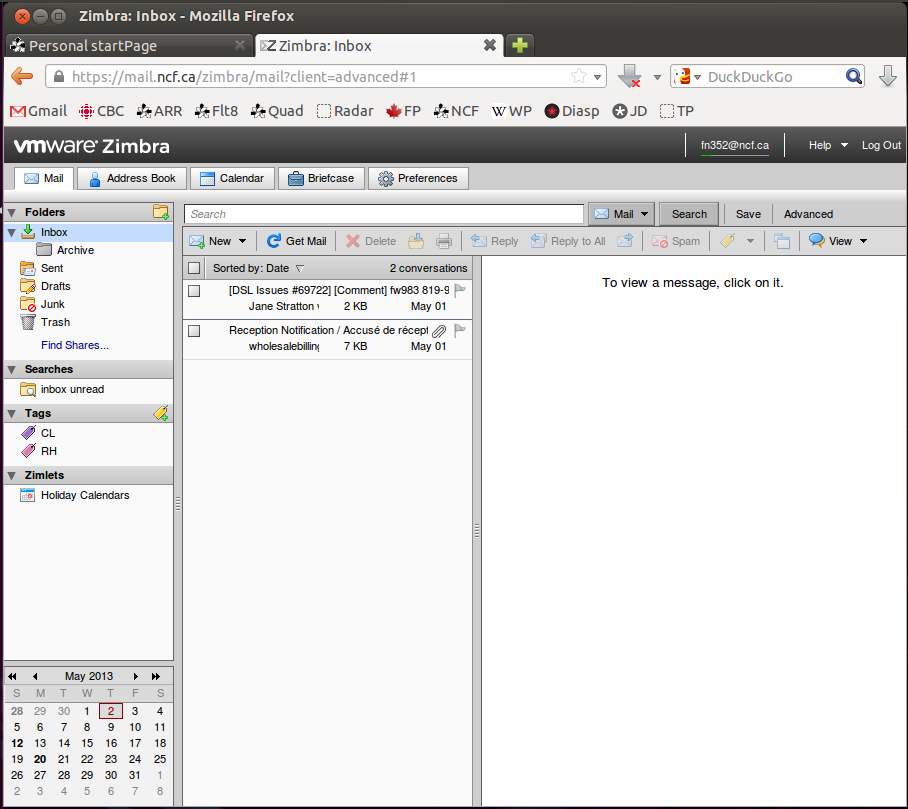
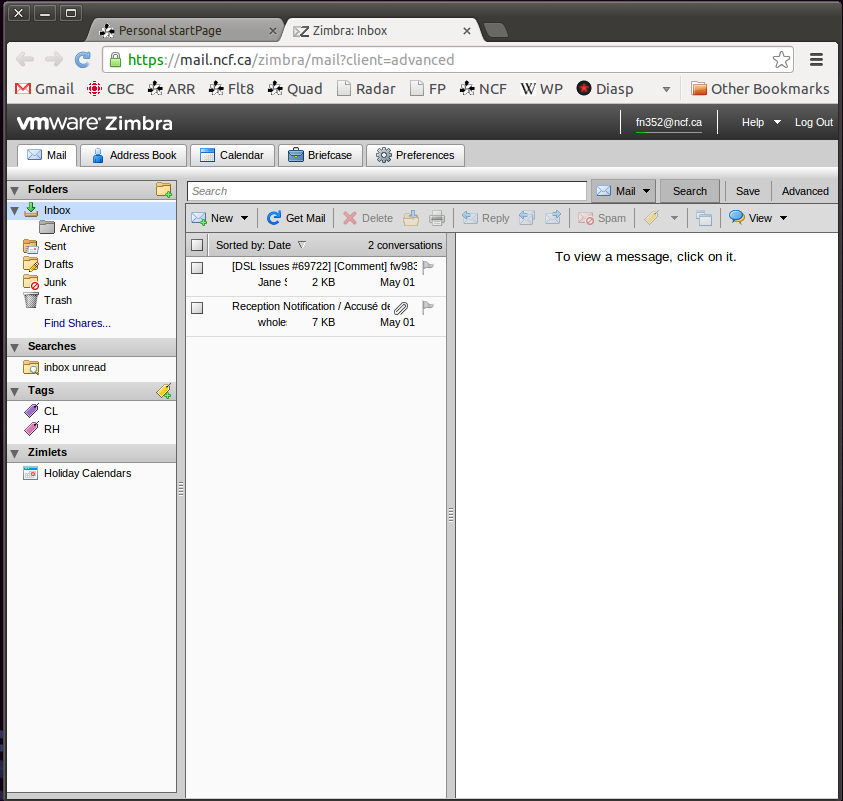
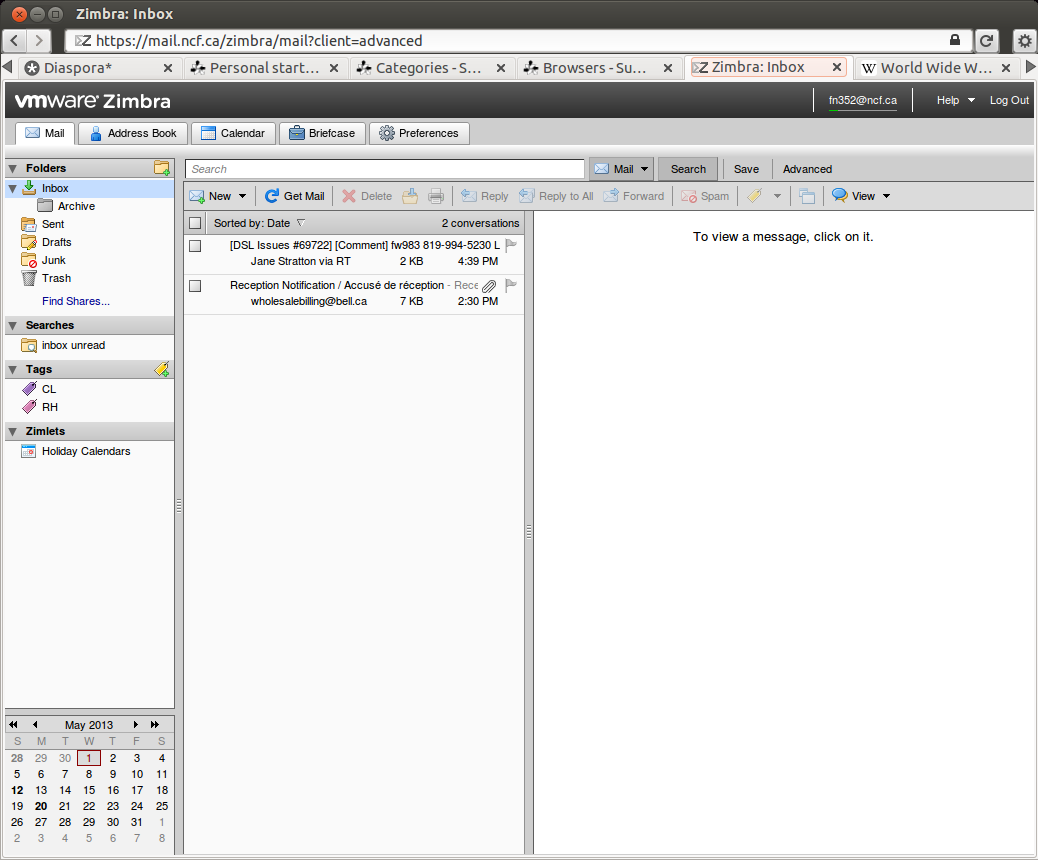
You can note that the Zimbra web mail interface looks the same in the three standards compliant browsers illustrated on the right, which is the way it should work!
¶ Internet Explorer
Microsoft Windows systems come with Internet Explorer (IE), which is a browser that has a long history of issues and has generally not been standards compliant. Later versions of IE, like IE9, IE10 and IE11 are supposed to be standards compliant, but testing shows that they do not render standards compliant web pages, like NCF’s Zimbra web mail pages, properly, which can cause problems. As a result Internet Explorer is not recommended.
Development of Internet Explorer was discontinued by Microsoft and version 11 is the last version released. It is not recommended for use.
In extensive testing of IE10 with Zimbra 7 in May 2013 NCF’s system administrator reported:
IE10… behaviour is inconsistent.
The first time I opened up Zimbra, it loaded up totally fine. Granted I did get a mystery error pop-up about a zimlet that couldn’t load, but that’s survivable.
Afterwards, it was giving me trouble, and I couldn’t get it to load at all, and then it loaded with text-only (basically gibberish), and then I got it to load again.
The compose/reply buttons don’t work. Unlike some of those that have complained, I’m more insistent on things working, so I tried a bit harder!
I found if I double-click on a message to load it in a separate menu, then I can get the reply to work…There’s no telling with this thing, clearly IE10 can’t be safely used with Zimbra right now.
NCF members have reported problems with IE11 and Zimbra version 7 as well, not rendering page menus correctly and other similar issues. According to member reports Zimbra 8 seems to work better with IE11 although it may be necessary to add https://mail.ncf.ca to “trusted sites” and also add it in Tools→Compatibility View as well.
¶ February 2014 compromise of Internet Explorer 10 and earlier
On 14 February 2014 Carnegie Mellon University in conjunction with the US Department of Homeland Security published a report that showed that IE10 and earlier versions had been compromised by a flaw in the browser design in combination with the Adobe Flash Player. Just viewing a website allows the browser to execute arbitrary code allowing the attacker to gain control of your computer. The report included the fact that the exploit code was publicly available and that it was being actively taken advantage of through a large number of attack websites.
Because these are older, unsupported versions, they will not have patches issued and thus can no longer be used. If you are using IE10 or earlier switch to using a different browser to protect your computer from being compromised.
Note that Windows XP users cannot install a newer version of Internet Explorer than IE8 and so must switch to an alternate browser.
¶ April 2014 compromise of all versions of Internet Explorer
In April 2014 the US Department of Homeland Security advised people to not use Internet Explorer, due to a security flaw that compromised all versions of the browser:
¶ April 2018 compromise of all versions of Internet Explorer
In April 2018 Naked Security reported that all versions of IE had been compromised by a “double kill” vulnerability. With all versions of IE no longer supported by Microsoft it is unlikely that they will be fixed and so the only action that can be taken is to not use this browser any longer.
¶ Microsoft Edge
Microsoft Edge is Microsoft’s new default browser for Windows 10, first released on 29 July 2015. It replaces Internet Explorer. It can only be used on Windows 10 and cannot be used on earlier versions of Windows. It incorporates some improvements over IE 11, including support for add-ons and HTML5 standards. Edge includes an integrated Adobe Flash Player and PDF reader. Edge is closed-source, proprietary software.
Edge has not proven very popular among users and by December 2017 had only a 1.9% share of the browser market.
¶ Old browsers
Internet standards change over time and browsers are updated regularly. Using older, outdated versions of web browsers is not recommended for several reasons:
- newer versions usually have fixed identified security issues, meaning that by using older browser versions you could compromise your computer
- newer browser versions incorporate newer features that show modern web pages properly. For instance older browsers will not support modern HTML5 or Ajax, which makes modern interactive sites, like Zimbra work.
Use the most up to date version of your favourite browser, that way web pages will work right and you will be more confident that old security vulnerabilities have been addressed.
¶ Getting a new browser
Rather than use IE, NCF recommends that you use other alternate, standards compliant browsers, all of which are available for free, such as:
- Apple Safari for macOS
- Brave for Linux, macOS, and Windows
- Chromium for BSD and Linux
- Gnome Web (formerly called “Epiphany”) for Linux
- Google Chrome for BSD, Linux, macOS, and Windows
- Midori for BSD, Linux and Windows
- Mozilla Firefox for BSD, Linux, macOS, and Windows
- Mozilla SeaMonkey for BSD, Linux, macOS, and Windows
- SRWare Iron for BSD, Linux, macOS, and Windows
- Vivaldi for Linux, macOS, and Windows
¶ Safer browsing
Most of these listed browsers have add-ons available to make internet use safer. Some browsers, like Firefox (since version 57) and Web (Epiphany), include features like ad-blocking natively, without add-ons.
The use of Adblock Plus and Ghostery will greatly reduce the number of opportunities to download malware and so installing these two add-ons is highly recommended. Find them at:
- Adblock-Plus will result in faster page loads, almost no advertising and the blocking of malicious javascript code.
- Ghostery blocks a lot of tracking and spyware, but may cause some websites to not work right.
Other good extensions are:
- uBlock Origin a wide-spectrum blocking extension which refuses many elements, including ads that track you, improving privacy on Firefox, Edge, Chromium and Chrome
- Privacy Badger from the Electronic Frontier Foundation which refuses tracking cookies, scripts and images, including ads that track you, improving privacy on Firefox, Opera, Chromium and Chrome
- HTTPS Everywhere, also from the Electronic Frontier Foundation, causes websites to use encryption wherever possible to improve privacy. For Firefox and Chrome.
Users should be careful of adding other browser add-ons, especially for Chrome, as some of these are malware themselves. Stick to browser add-ons that have been recommended by reliable sources.
¶ See also
¶ External links
- Proprietary Software Is Often Malware
- Test your version of Adobe Flash
- Test your browser for HTML5 compatibility
- The Best Browser Extensions that Protect Your Privacy, by Alan Henry, Life Hacker
- Privacy Tools
- You say advertising, I say block that malware, by Violet Blue, Engadget
- 10 Ad Blocking Extensions Tested for Best Performance, Raymond CC