VoIP means Voice Over Internet Protocol, where your telephone service is provided via the internet. If you have a reasonable quality Internet connection you can get phone service delivered through your Internet connection instead of from your local phone company.
Most existing phones can be supported directly by connecting them to a device (Analog TelephoneAdapter – ATA) that handles the voice conversion and connection.
¶ Why would I choose VOIP?
The cost of VOIP service is lower than traditional landline telephony. This is due in part to economies of using the shared data network and partly due to monopoly pricing on landline services.
With VOIP, your phone number is portable. Anywhere you can plug into the network you can make and receive calls as if it were a local number.
VOIP also enables a number of features that come as standard offerings for your phone service.
¶ Advantages to using VOIP rather than landline
- Savings
- Flexibility in terms of features available
- Mobility - Phone service is available anywhere you have access to the internet
- You can have your Voice Mail directed to your email
- Inexpensive long distance calling (if not free)
- Softphone availability for your mobile device
¶ Disadvantages of using VOIP Service
- 911 Service is not as reliable in case of emergencies (the location may change)
- Requires a stable Internet service (No Internet → No phone service)
- The phone service is not as stable as landline (No power → no internet and no phone service)
¶ Things to beware of
If you have poor Internet quality then your VOIP service will suffer as it runs over that Internet line. Also, unlike landline phonesets that are powered by the phone line itself, if power fails at your residence, it will take out your router, your ATA and your VOIP phone service. No power means no phone service unless you have UPS equipment in place.
With a landline service, a 911 operator knows exactly where you are because you are hard-connected at a specific address. With VOIP you have portability and address variability so that the subscriber (you) must inform the provider (us) of any address changes. That way , when a 911 call is placed, the operator can refer to the correct registered information.
Some services at your residence may require a landline to function. Home security systems, door buzzer systems, etc. may be a problem. Please consult the providers of those services for details.
¶ Ordering VOIP
Members going to a VOIP service from a landline based phone will fall into one of two categories:
A. you want to keep your existing number have it ported to the VOIP provider
B. you will be dropping their existing number and using a new one provided by the VOIP provider
For all cases, a dry line install is required to replace the current service.
Our recommended process prioritizes guarding against you permanently losing your phone number and reduces the risk of service outage as much as possible.
For members in Category (A):
- Contact the VOIP provider and schedule a port of your phone number to be a minimum a week in the future (more time is better).
- Do not ask Bell to cancel the number just yet.
- Contact NCF as soon as you have the porting date from your VOIP provider and we will schedule a dry installation to match.
- Once the port is confirmed complete by your VOIP provider, test the number yourself. Once you are certain it is functioning, call Bell to confirm cancellation of the voice service (to avoid additional monthly charges). Remember to ask for a confirmation number when speaking with the Bell representative.
- NCF will ensure your dry DSL line gets connected as soon as possible. Contact NCF if you there are any delays/issues with porting your voice line to the VOIP provider.
Notes:
- You may encounter a temporary service disruption.
- We recommend you make arrangements to having a temporary non-VOIP contact number (like a cellphone) or a neighbour’s number.
- A new dry line installation costs $49.95 + tax (passed on to Bell) which is incurred again in the future if you choose to upgrade your speed.
- We recommend considering potential speed upgrades now to avoid paying that fee again in the future.
For members in category (B), life is simpler:
- Contact the VOIP provider and order your new VOIP service and ATA device (the box that connects your home phone to your router).
- Do not ask Bell to Cancel the Number just yet.
- Once your receive your ATA, connect it to your existing DSL service and test it out.
- Once you are certain it’s working, contact NCF to order a dry line - this should be a minimum a week in the future .
- NCF will ensure your dry DSL line gets connected as soon as possible.
Notes:
- You may encounter a temporary service disruption.
- We recommend you make arrangements to having a temporary non-VOIP contact number (like a cellphone) or a neighbour’s number.
- A new dry line installation costs $49.95 + tax (passed that on to Bell) which is incurred again in the future if you choose to upgrade your speed.
- We recommend considering potential speed upgrades now to avoid paying that fee again in the future.
This process is a bit of a tricky dance that we are constantly refining from our experience processing such requests for multiple members. Please let us know if you require any further clarification.
¶ Using VoIP with a TP-Link modem
If you are using VoIP with a TP-Link TD-8816, TD-8817, TD-8840T, TD-8841T, TD-W8101G or TD-W8901G modem you may experience problems such as voice being received but not transmitted after a connection is established. This may be addressed with a command line setting change in the modem to enable this via telnet to 192.168.1.1.
ip nat service sip sw off
If the command is successful the following line will be returned:
nat sip v2 switch off
Note that this configuration change cannot be saved and so when the modem is rebooted or powered off, the command will have to be re-run.
¶ Accessing Telnet
¶ Linux and Mac
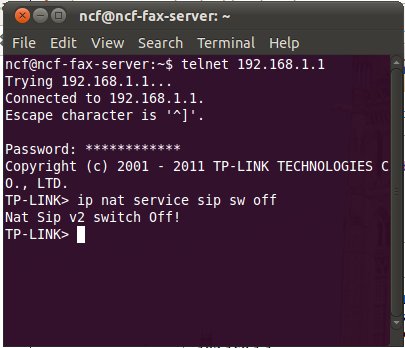 On Linux operating systems you can access telnet by opening a terminal and typing in “telnet 192.168.1.1” at the prompt.
¶ Windows
On Windows XP and Vista operating systems telnet can be accessed by opening “run” and the “cmd” command and entering telnet.
In Windows 7 and 8 you can bring up the command line by entering “cmd” in the search bar.
In any version of Windows you can also run telnet by installing and using the PuTTY free software application.
For complete Windows instructions see this TP-Link page.
¶ Using Teksavvy TekTalk
Here are instructions provided by Teksavvy support to one of our members. We have not confirmed these but provide them for our member’s benefit.
- disable ALG and SPI router firewalls
- add rules to forward ports (both UDP and TCP):
- 443
- 5060-5080
- 16384 to 16482
- 5004