Summary of Configuration Information and Changes |
Modem Login Page: Modem Administrator User Name: Modem Administrator Password: |
Where to go in Menu: |
Changes: |
1. Using an Ethernet cable plug into one of the yellow Local Area Network Ports at the back of the Sagemcom 2864 modem. Connect to the Local Area Network (NCF_XXXX) on your computer. Your computer should indicate an Ethernet connection as opposed to a wireless one. 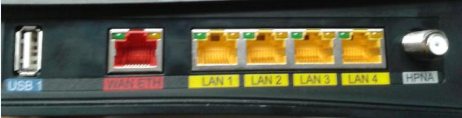
2. Open an Internet browser on your computer and connect to the modem by typing 192.168.2.1 in the address bar.
3. Enter the username and password when prompted
- Username: admin
- Password: Your DSL password (Default is password, if you reset modem)
4. From the home page, navigate to Wireless menu option on the left. 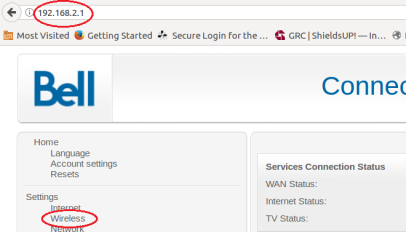
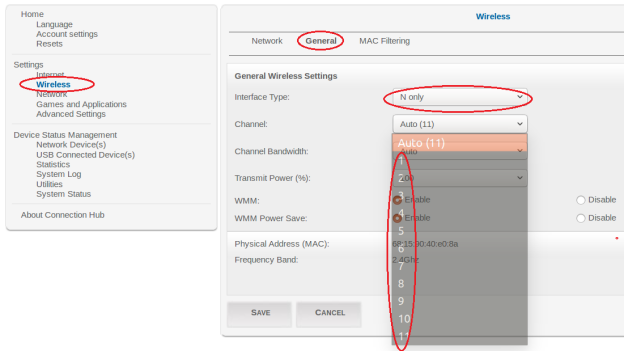
5. On the [Wireless] page, navigate to the [General] tab and make the following changes:
- Channel: change from Auto to channel with the least interference as determined by your wireless interference tests. Try 3,4, 8 or 9
- Channel Bandwidth: change from Auto to 20mhz
- Click Save
Notes
- Wireless channels shouldn’t have to be changed often (more than once every 6-12 months). If you find yourself making these changes too frequently, you may have to invest in a mid to high end router with additional channels on the 5Ghz frequency. Contact support@ncf.ca for recommendations if needed.
¶ See also
- Modem Configuration - for a complete list of instructions for all NCF modems
- Modem Lights
- Sagemcom 2864 set-up PDF
- VOIP
¶ External Links
- Unofficial Sagemcom 2864 bridge mode guide
- Unofficial Sagemcom 2864 bridge mode guide #2 - no unlocking or firmware download required
- Wireless Spectrum Conundrum Basic Wireless Spectrum Information, by Lou Frenzel, Electronic Design
- 4 Reasons Why Your Wi-Fi Is So Slow (And How to Fix Them) by James Frew, Make Use Of
- How to Stay Safe When Using Public Wi-Fi, by Steve Sande, Rocketyard
- How easy is it to capture data on public free Wi-Fi? by Gary Sims, Android Authority