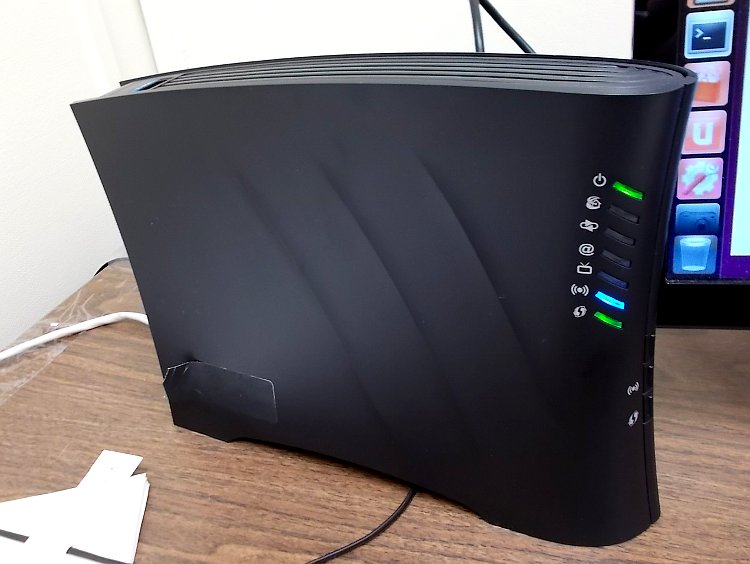
 The Sagemcom 2864 is for use on service over 25 MB/s on networks using Bells’ DSL infrastructure.
NCF sold these modems from November 2013 to August 2014 for members on 25 MB and faster service.
The Sagemcom 2864 does not come with any manuals and there do not seem to be any manuals available on the company website.
¶ Getting started
- Plug the power connector into the Sagemcom 2864 and plug the other end into an AC wall jack.
- Note: there is no “power on/off” switch on the Sagemcom 2864.
- Note: the Sagemcom 2864 takes a long time to boot up, as much as five full minutes
- Note: This page shows what the Sagemcom 2864 lights tell you.
- Connect an Ethernet LAN cable to one of the ports and the other end to your computer
- Note: Do not connect anything to the cable coax connection. It should never be connected to any coax cable.
- Connect the modem to the wall phone jack
- In your browser’s address bar, enter the IP address for the modem interface page, or click here: 192.168.2.1
- If the modem is fresh from the factory, use the default user name and password to gain access:
- user: admin
- password: admin
If the modem was previously configured for someone else, the password would be the previous user’s DSL password. If it is unknown then do a reset to factory default, using a paper-clip in the reset hole on the back. Hold until the power light turns off to reset. The user name and password will now be as above.
Note: The Sagemcom 2864 doesn’t act like other modems after a factory reset. While most modems erase the password, reset everything to factory defaults and thus will not connect, the Sagemcom 2864 does not erase the password, but it does reset everything else to factory defaults. If the modem is connected to the internet after a reset it will sign on and connect, but will only go to a single Bell website intended to allow Bell customers to sign up. NCF members can disregard this and proceed to configure the modem to connect to NCF’s internet service.
Note: When connecting the Sagemcom 2864 for the first time and occasionally on subsequent connections, the LED near the ‘@’ symbol will flash red indicating that a firmware update is in progress. If this occurs then leave the modem on until the LED is no longer flashing red. No configuration should be attempted until this is complete. A firmware update may result in the loss of user name and password in which case the modem will only connect to the one Bell sign-up website, as mentioned above. This is an indication that it needs to be reconfigured with this information.
¶ Entering the configuration information
When the modem interface appears in the browser, proceed as follows:
| DSL Quick Configuration Info (Sagemcom DSL modems) |
|---|
| Modem Web Interface |
| Modem login |
| DSL username |
| DSL Password |
| Firewall |
| Wireless |
- Select Home→Account settings
- Set a new admin password by entering the existing password (“admin”) and your new password.
- Note: by default NCF uses your DSL password here.
- Click Save
- Select Settings→Internet
- Enter your user id (like “aa001@ncf.ca”) and your DSL password
- Note: don’t forget the “@ncf.ca” or it won’t connect
- Click Save
- Select Settings→Wireless
- Primary Wireless Network should be Enabled
- Broadcast Primary SSID should be Enabled
- Enter an identification name for your network under SSID
- Note: The SSID is the identification of the network that is broadcast.
- Note: Any identification can be used, but it is recommended that you do not set an SSID that identifies your name or your home’s address
- Note: By default NCF sets the SSID following the format of “NCF_0000”, where the 0s are the last 4 digits of the modem’s serial number
- The wireless password can be any password
- Note: by default NCF uses your DSL password here.
- Security mode, confirm WPA2-PSK (AES)
- Guest Wireless Network, confirm Disabled
- Click Save
- Select Settings→Advanced Settings
- Confirm WAN Mode is Auto
- Click Save if changed
- Select Settings→Network
- Confirm DHCP status is Enabled
- Click Save if changed
The modem should now connect, although it may take several minutes to complete the connection and give a blue “in service” “@” light indicating internet service is available.
¶ Firewall configuration
The modem interface GUI does not offer any means of configuring the modem’s firewall. Testing shows that that by default the firewall is on and all ports are closed and non-responsive, except Port 22 (SSH), which is closed but responds.
¶ Testing
Once on line it is recommended that you carry out two tests:
- a speed test
- a security and firewall test with Shields Up
¶ Modem set-up screenshots
¶ Welcome to Bell Page Problem
¶ The Symptom
If this occurs, members see a Bell splash page when they enter their browser. The page requests a login (with Bell credentials) which our members can’t complete.
No other modem configuration details are disturbed other than the Internet login.
¶ The Cause
The root cause is not known, but may involve some type of reset signal on the DSL line.
¶ The Fix
The correct credentials need to be put back into the modem. Those credentials are:
- User: eg. aa000@ncf.ca
- Password: ncf… (typically, a 12 alpha-numeric characters string)
That can be done in at least 3 ways:
- on your own – the instructions for this are given below
- NCF staff can walk you through the process over the phone
- you can bring the modem into the office and we’ll deal with it
¶ Instructions to change the Internet logon values
Here are the instructions to recover full Internet access from the Sagemcom modem:
- connect an Ethernet cable between a PC and the modem
- Start up a browser on the PC
- In the address bar, type ‘192.168.2.1’ (without the quotation marks), press Enter
- you should see a login window
- for the user, type: ‘admin’ (without the quotation marks), and for the password type: <your 12 character NCF DSL password: ncf…>
- you should now see a window labeled ‘Connection Hub’
- In the menu on the Left Hand side of the window, click on the ‘Internet’ field
- you should now see a window with a userid and password fields – the userid will show ‘sc…’
- in the user field, enter your NCF ID followed by ‘@ncf.ca’ (e.g., aa000@ncf.ca)
- in the password field, enter your NCF DSL password (your 12 character NCF DSL password: ncf…)
- click the ‘Save’ button at the bottom of the window
- when you see the ‘Settings Saved’ message, the Internet light (the one with the @ sign) should start to blink red and then turn blue - this may take some time.
Access should be restored and your work is done.
It’s possible that a power cycle may be required to get the modem to recognize the configuration change so if a “Save” doesn’t restore your Internet, try that.
¶ See also
- Modem Configuration - for a complete list of instructions for all NCF modems
- Modem Lights
- Sagemcom 2864 set-up PDF
- Changing WiFi Channels on Sagemcom 2864
- VOIP